The Blog

Using a Polycom Soundstructure as a Digital Audio Mixer

Introduction

So I found that you can get your hands on a “teleconference processor” such as the Polycom Soundstructure C16 for surprisingly cheap. I only happen to have one since a seller threw it in when I was buying a Crestron DMPS-300 for cheap to use as an HDMI video switcher…

I just assumed it was going to be some proprietary nonsense only usable for Polycom VoIP equipment, and so I let it sit for a while. Until today after dinner where the thought randomly occurred to me that - hey wait a second - this thing has 16 inputs and 16 outputs, right?

I wonder if those inputs have preamps that would let me hook up mics? If so, it probably has an EQ and given it's bound to be digital, maybe has flexible bands?

The motivation

You see, an “entry” tier digital audio mixers like a Behringer XR18 (or smaller cousins XR16 or XR12) are more flexible than their analog counterparts, but come with a steep price tag.

I didn't have to look far at all since the documentation for this thing can be found shockingly easily - like yeah you can find the Crestron tools on very shady FTP sites, but these were just public. I'll attach the things I found later on in this page.

So anyway, I started digging into it - and it turns out I severely underestimated the capabilities of this thing, and just how open and easy the control interface is, it's shockingly flexible.

The Capabilities

Take a look at this:

  • You've 10 band parametric EQ on the inputs
  • You've got gating, compression and limiters
  • AEC that we can disable and never touch
  • Feedback elimination – need to see if this is any good (the Behringer FeedbackDestroyer is AKA the flute destroyer)
  • Auto gain and auto mix can be turned off, I need to try it and see if they are any use

Things not on here

  • 60 dB of analog gain headroom before the DAC from what I can tell
  • There is per-port phantom power on all 16 inputs
  • Each input is balanced or unbalanced for mic or line
  • Each input has the same signal chain

Also apparently you can buy up to three of these and chain them via firewire, to use any input across the units with any output. Seems easy way to expand to 32 ins and 32 outs.

Input signal chain

Here is a good diagram from the PDF:

This shows the exact order of operations.

The most interesting thing on here is the mux that produces the recording, conference and reinforcement outputs, since this is something different than a normal digital mixer.

  • Each signal is split, and when setting up the in-out matrix, you can pick which of these three feeds to give each output.
  • The ungated is useful since you can grab it post-EQ but before any “conference” specialty things
  • I'm also testing the sound reinforcement out, since you can enable/disable any of the steps in this chain on the fly.

Matrix setup

Here is control you get:

On each output, you can pick levels of each input, pan (if stereo out), and which point to get.

Output chain

Here is the steps on the output:

  • Each output has it's own EQ and fader, which means beyond having a master out, this can be used for all the monitor outputs while giving a custom EQ to each.
  • You can also just make a direct out, give source audio for say an FX SEND.

Poking Around

My first step was figure out what the IP address was on my unit - easy to wireshark and wait for a packet. Then I checked what ports exist:

PORT    STATE SERVICE
21/tcp  open  ftp
23/tcp  open  telnet
79/tcp  open  finger
80/tcp  open  http
111/tcp open  rpcbind
113/tcp open  ident
513/tcp open  login
514/tcp open  shell

I figured I may as well go to the HTTP port and we get a little welcome page:

Amazingly, if you click the link, it goes to a local copy of all the commands and parameters!

By the way all the commands and parameters listed here are also available in the PDF.

Through this process I'm kind-of amazed at how simple it is to use? Like, I'm so used to having to reverse-engineer the command set or hack something together to be able to use hardware for unintended purposes, that just giving me the API feels wrong almost.

Anyway, if you look through the list, there's controls for basically everything you then see in their software. The one bit I don't know yet is presets. If presets work, than this becomes even more useful as I can bake presets for each group performing, and jump between them.

Using SoundStructure Studio

I was able to find the software on the HP website, and it didn't require any login which is again a nice change for once. It works just fine in WINE on Linux, and was able to access the SoundStructure over the LAN connection.

I may as well point out you can use LAN over their control interface, OR you can telnet, OR you can use the serial port. Both the SW and you can control it either way.

The software is _fine_, it's not the best UI but they have some presets, and the UI is actually usable. Here is the default preset they start you with:

It's both similar and different than say the XR18 UI.

So I of course immediately wanted to throw that out and test how far I can push it.

and here you go!

  • 13 channels of mic/instrument inputs
  • 1 channel of effect return
  • 2 channels of line in (stereo)
  • 1 main output
  • 1 effect send
  • 8 monitor outputs
  • 1 stereo pair for a USB interface (and we're not using up all the outputs yet)
  • You can make subgroups as you see fit (I think up to 16) so you can do mics, instrument, drums like you would on an actual sound board

Using as a sound mixer

  • It's also worth noting this channel assignment and settings are saved to EEPROM so you don't have to set up your channel configuration, you can start with this, then just use the commands to jump between the settings on these. (so you could implement “presets” just at a higher level of abstraction)
  • Similarly a way for better external control might be make all inputs/outputs here uniform, then control them all via the commands instead of using this software (since eg channel names are used in the API, so maybe name in/out, then have your higher level external program name them based on a json for example).

* On each input here, you can see the gain, mute, phantom power, then which tap-point from the signal chain to use. Then EQ and feedback suppression, then echo cancel, noise cancel, gain control, dynamics, automix, delay and fader.

* I took a look at what the options on the EQ and dynamics are, and it's not bad!

* here is what you get in automix, seems they're just doing a way for you to keep all channels open and it picks them as it needs. maybe not for live music but for say a panel this might be useful

* finally here is the matrix configuration. again, you get level, pan and the tap-point to use.

Side note
  • One thing I'm used to seeing of course is that the fader on the input would really be the control for the main bus + fx (which are post-fader), but not the monitors, which are pre-fader
  • On this “board”, main is treated like any other input, so it has a fader in this matrix, that is after the fader in the input.
  • and by that logic, all the monitor outs are post-fader, after the fader on the input.

This lends itself to kinda two modes of operation:

  • Keep the input fader at 0, then control the actual mix level from input to everywhere from the matrix
    • You then use the matrix for the monitor as well, but it's on you to match FX SEND level to main
    • To get away with this, you almost need to implement external control so you can bring the fader dials for all the sends on the same page as say the EQ control
  • You set and forget the matrix to main at 0, use the fader on the input channel
    • This is easier in this native program, but makes your monitors post fader

Controlling Externally

  • To build external control, is somewhat re-implementing their software and I haven't figured out if I take it on.
  • I figure I can make a rust main server that talk to this, then make my UI with egui or kotlin to use a tablet (or web to serve both…)
  • We can re-invent a lot of what their software has, our own form or presets, heck we could monitor levels and do our own adjustments even
  • Same with adjusting if things are mic vs line, so on. The easiest way might be telnet, ie, open a socket to port 23 and make commands
  • My main issue is going to be queueing commands and keeping the UI synced… And no I don't want to vibe code this

Hardware Adaptations

  • Really this is the other big issue, this uses terminal connectors for permanent install, not XLR or 1/4“.
  • You can buy an XLR patch panel but then you've spent more money on that than this board.
  • Then you need to solder like 32 XLR connectors… and wire them to screw terminals
  • (holup I'm starting to see how Behringer can charge $300 now)

Still might be a fun weekend project though :)

Downloads

Get the SoundStructure Studio software from Polycom directly here: https://downloads.polycom.com/voice/SoundStructure/studiosetup-1-9-1.zip Get the design guide PDF and software manual (where the signal chain charts came from) here: https://polycom-moscow.ru/pdf/SoundStructure_Design_Guide.pdf

2026-04-23 07:17 · Tony

Comparing AMD GPU Moonlight+Sunshine Streaming Using H264 AVC vs H265 HEVC

To my eyes, in certain conditions, H.264 looks better than H.265 when running Sunshine and Moonlight from my desktop to laptop.

Desktop is running a R9 7900X with RX 6700 XT. Laptop is a R5 5650U.

H@VC should almost always outperform H264, right? Except to my eyes, sometimes, H264 looks better…

Found two causes:

a) h264 remains sharper (but with blocking artifacts), whereas h265 is overall higher quality but blurrier thanks to deblocking

b) look at this same image, captured at 1920×1080, in h264 and hevc of streaming my computer:

H.264 AVC

H.265 HEVC

Look at the text! (I know this is a poor example, I should have put more 1px wide lines and text)

Notice how the 265 has the green bar at the bottom?

h264 is sending real 1920×1080, so it is displayed with no scaling hevc for some reason has the green bar on the bottom. this messes up the aspect ratio, and thus the whole image is scaled, resulting in all 1px lines and text being blurry

that's contributing to why I keep thinking hevc is blurrier - because it is. you can't have crisp text on bilinear scaled content

so wtf is the green bar? is this like the AMD 1920×1082 issue on AV1? where the hw encoder only outputs blocks of certain sizes?

Both are running 1080p60 at 4 Mbit/s. Low, but fine for my non-gaming use.

2025-12-31 06:05 · Tony

Playing .mod tracker music

The sound of 16 bit. When programmers made music.

From the era when you had CPU power to just play PCM samples.

Not enough CPU to decompress a full file, but not enough storage to store a full PCM track.

Enter mod/xm3 files.

It's like midi but way more cooked.

You pick a set number of PCM samples which you will use to make your music.

Say a piano sound, a drum sound, so on. Encode those 8 bit or 16 bit PCM.

Then, you have a set number of channels, 4 for mod.

You pick which sample to load, at what volume, and what pitch. That's all.

So, 4 things play at once, you have 16 sounds you picked, you can make a full song!

You can use things like miltytracker but that is boring.

How small would the files and a decoder be? I wanted to try this on a low power microcontroller.

But first, the proof of concept in Linux.

In 500 lines, I was able to read the file and pipe it to ALSA.

Compiled binary on Linux is 21 KiB, meaning without alsa and on microcontroller, we can make it happen.

The song file I'm using is also only 60 KiB! I'm sure there may be a way to turn MIDI into MOD adding more music.
Or make a neural net to pick 16 samples out of a song and create the .mod file.

It's not perfect, it only plays a subset of files, and my timings are off, but not terrible for an hour of effort.

#include <stdio.h>
#include <stdlib.h>
#include <stdint.h>
#include <string.h>
#include <math.h>
#include <alsa/asoundlib.h>
 
// MOD file constants
#define MAX_SAMPLES        31
#define NUM_CHANNELS       4
#define ROWS_PER_PATTERN   64
#define BYTES_PER_NOTE     4
#define SAMPLE_RATE        44100
#define BUFFER_SIZE        1024
#define BASE_TEMPO 125  // Default MOD tempo in BPM
 
// Note period table for Amiga frequency conversion
const uint16_t period_table[] = {
    // C    C#   D    D#   E    F    F#   G    G#   A    A#   B
    856, 808, 762, 720, 678, 640, 604, 570, 538, 508, 480, 453, // Octave 1
    428, 404, 381, 360, 339, 320, 302, 285, 269, 254, 240, 226, // Octave 2
    214, 202, 190, 180, 170, 160, 151, 143, 135, 127, 120, 113  // Octave 3
};
 
// Pattern data structure
typedef struct {
    uint8_t sample;    // Sample number (0-31)
    uint16_t period;   // Note period
    uint8_t effect;    // Effect number
    uint8_t param;     // Effect parameter
} Note;
 
// Sample data structure
typedef struct {
    char name[22];
    uint16_t length;           // Length in words (2 bytes)
    uint8_t finetune;          // Finetune value (0-15)
    uint8_t volume;            // Default volume (0-64)
    uint16_t repeat_point;     // Repeat point in words
    uint16_t repeat_length;    // Repeat length in words
    int8_t *data;              // Sample data (8-bit signed)
} Sample;
 
// MOD file structure
typedef struct {
    char title[21];
    Sample samples[MAX_SAMPLES];
    uint8_t song_length;       // Number of positions
    uint8_t positions[128];    // Pattern sequence
    uint8_t num_patterns;      // Number of patterns (calculated)
    Note (*patterns)[ROWS_PER_PATTERN][NUM_CHANNELS]; // Pattern data
} MODFile;
 
// Channel state
typedef struct {
    uint16_t period;           // Current note period
    uint8_t sample_num;        // Current sample number
    uint8_t volume;            // Current volume (0-64)
    uint32_t sample_pos;       // Position in sample (fixed point: 16.16)
    uint32_t sample_increment; // Sample position increment per tick
    uint8_t effect;            // Current effect
    uint8_t param;             // Effect parameter
    uint8_t porta_target;      // Portamento target period
    uint8_t vibrato_position;  // Vibrato wave position
    uint8_t tremolo_position;  // Tremolo wave position
} ChannelState;
 
// Read a 2-byte big-endian value
uint16_t read_big_endian_16(const uint8_t *data) {
    return (data[0] << 8) | data[1];
}
 
// Convert Amiga period to frequency
float period_to_freq(uint16_t period) {
    if (period == 0) return 0;
    return 7159090.5f / (period * 2);
}
 
// Print a message and exit if ALSA returns an error
void check_alsa_error(int err, const char *msg) {
    if (err < 0) {
        fprintf(stderr, "%s: %s\n", msg, snd_strerror(err));
        exit(EXIT_FAILURE);
    }
}
 
// Add this function before main()
int calculate_tick_samples(int tempo) {
    // Calculate samples per tick based on tempo
    // 2500 / tempo = milliseconds per tick
    // (ms * sample_rate) / 1000 = samples per tick
    return (2500 * SAMPLE_RATE) / (tempo * 1000);
}
 
 
// Load a MOD file
int load_mod_file(const char *filename, MODFile *mod) {
    FILE *file = fopen(filename, "rb");
    if (!file) return 0;
 
    // Get file size
    fseek(file, 0, SEEK_END);
    long file_size = ftell(file);
    fseek(file, 0, SEEK_SET);
 
    // Read the entire file into memory
    uint8_t *data = (uint8_t*)malloc(file_size);
    if (!data) {
        fclose(file);
        return 0;
    }
 
    fread(data, 1, file_size, file);
    fclose(file);
 
    // Read title
    memcpy(mod->title, data, 20);
    mod->title[20] = '\0';
 
    // Read sample information
    uint8_t *ptr = data + 20;
    for (int i = 0; i < MAX_SAMPLES; i++) {
        memcpy(mod->samples[i].name, ptr, 22);
        mod->samples[i].name[22] = '\0';
        ptr += 22;
 
        mod->samples[i].length = read_big_endian_16(ptr) * 2; // Convert to bytes
        ptr += 2;
 
        mod->samples[i].finetune = *ptr++;
        mod->samples[i].volume = *ptr++;
 
        mod->samples[i].repeat_point = read_big_endian_16(ptr) * 2; // Convert to bytes
        ptr += 2;
 
        mod->samples[i].repeat_length = read_big_endian_16(ptr) * 2; // Convert to bytes
        ptr += 2;
    }
 
    // Read song information
    mod->song_length = *ptr++;
    ptr++; // Skip unused byte
 
    memcpy(mod->positions, ptr, 128);
    ptr += 128;
 
    // Skip 4 bytes (format identifier M.K. or similar)
    ptr += 4;
 
    // Determine number of patterns
    mod->num_patterns = 0;
    for (int i = 0; i < mod->song_length; i++) {
        if (mod->positions[i] > mod->num_patterns) {
            mod->num_patterns = mod->positions[i];
        }
    }
    mod->num_patterns++;
 
    // Allocate and read pattern data
    mod->patterns = (Note (*)[ROWS_PER_PATTERN][NUM_CHANNELS])malloc(
        mod->num_patterns * ROWS_PER_PATTERN * NUM_CHANNELS * sizeof(Note));
 
    for (int p = 0; p < mod->num_patterns; p++) {
        for (int r = 0; r < ROWS_PER_PATTERN; r++) {
            for (int c = 0; c < NUM_CHANNELS; c++) {
                uint8_t b0 = *ptr++;
                uint8_t b1 = *ptr++;
                uint8_t b2 = *ptr++;
                uint8_t b3 = *ptr++;
 
                // Decode note data
                uint16_t period = ((b0 & 0x0F) << 8) | b1;
                uint8_t sample = (b0 & 0xF0) | (b2 >> 4);
 
                mod->patterns[p][r][c].period = period;
                mod->patterns[p][r][c].sample = sample;
                mod->patterns[p][r][c].effect = b2 & 0x0F;
                mod->patterns[p][r][c].param = b3;
            }
        }
    }
 
    // Read sample data
    for (int i = 0; i < MAX_SAMPLES; i++) {
        if (mod->samples[i].length > 0) {
            mod->samples[i].data = (int8_t*)malloc(mod->samples[i].length);
            memcpy(mod->samples[i].data, ptr, mod->samples[i].length);
            ptr += mod->samples[i].length;
        } else {
            mod->samples[i].data = NULL;
        }
    }
 
    free(data);
    return 1;
}
 
// Release MOD file resources
void free_mod_file(MODFile *mod) {
    for (int i = 0; i < MAX_SAMPLES; i++) {
        if (mod->samples[i].data) {
            free(mod->samples[i].data);
            mod->samples[i].data = NULL;
        }
    }
    if (mod->patterns) {
        free(mod->patterns);
        mod->patterns = NULL;
    }
}
 
// Render simple ASCII visualization
void render_visualization(ChannelState *channels, MODFile *mod, int position, int row) {
    printf("\033[H\033[J"); // Clear screen
 
    // Display module info
    printf("Module: %s\n", mod->title);
    printf("Position: %d/%d  Pattern: %d  Row: %d/64\n\n",
           position, mod->song_length, mod->positions[position], row);
 
    // Display channels
    printf("Channel | Sample  | Period | Volume | Effect\n");
    printf("--------|---------|--------|--------|--------\n");
 
    for (int c = 0; c < NUM_CHANNELS; c++) {
        const char *sample_name = "<none>";
        if (channels[c].sample_num > 0 && channels[c].sample_num <= MAX_SAMPLES) {
            sample_name = mod->samples[channels[c].sample_num-1].name;
        }
 
        printf("   %d    | %-7d | %6d | %6d | %X%02X  %s\n",
               c+1, channels[c].sample_num, channels[c].period,
               channels[c].volume, channels[c].effect, channels[c].param,
               sample_name);
    }
 
    // Simple volume meters
    printf("\nVolume Meters:\n");
    for (int c = 0; c < NUM_CHANNELS; c++) {
        printf("[%d] ", c+1);
 
        // Only show if channel is active
        if (channels[c].period > 0 && channels[c].sample_num > 0) {
            int vol_bars = (channels[c].volume * 30) / 64;
            for (int i = 0; i < 30; i++) {
                printf("%c", i < vol_bars ? '#' : '.');
            }
        } else {
            printf("<inactive>");
        }
        printf("\n");
    }
 
    fflush(stdout);
}
 
// Process one tick of audio
void process_tick(MODFile *mod, ChannelState *channels, int16_t *buffer, int buffer_size) {
    // Clear buffer
    memset(buffer, 0, buffer_size * sizeof(int16_t));
 
    // Mix channels
    for (int i = 0; i < buffer_size; i++) {
        int32_t mixed = 0;
 
        for (int c = 0; c < NUM_CHANNELS; c++) {
            if (channels[c].period > 0 && channels[c].sample_num > 0) {
                int sample_idx = channels[c].sample_num - 1;
 
                if (sample_idx >= 0 && sample_idx < MAX_SAMPLES &&
                    mod->samples[sample_idx].data &&
                    mod->samples[sample_idx].length > 0) {
 
                    // Get current sample position
                    uint32_t pos = channels[c].sample_pos >> 16;
 
                    if (pos < mod->samples[sample_idx].length) {
                        // Apply volume and mix
                        int sample_val = mod->samples[sample_idx].data[pos];
                        mixed += ((sample_val * channels[c].volume) / 64) * 4; // Increase gain by 4x
 
                        // Update position
                        channels[c].sample_pos += channels[c].sample_increment;
 
                        // Handle looping
                        if (mod->samples[sample_idx].repeat_length > 2) {
                            uint32_t loop_end = mod->samples[sample_idx].repeat_point +
                                                mod->samples[sample_idx].repeat_length;
 
                            if ((channels[c].sample_pos >> 16) >= loop_end) {
                                channels[c].sample_pos = mod->samples[sample_idx].repeat_point << 16;
                            }
                        } else if ((channels[c].sample_pos >> 16) >= mod->samples[sample_idx].length) {
                            // Stop playback if no loop
                            channels[c].sample_pos = 0;
                            channels[c].period = 0;
                        }
                    }
                }
            }
        }
 
        // Clamp and store in buffer
        if (mixed > 32767) mixed = 32767;
        if (mixed < -32768) mixed = -32768;
 
        // Scale appropriately for 16-bit output
        buffer[i] = mixed;
    }
}
 
// Process a row of the pattern
void process_row(MODFile *mod, ChannelState *channels, int position, int row) {
    int pattern = mod->positions[position];
 
    // Process each channel
    for (int c = 0; c < NUM_CHANNELS; c++) {
        Note note = mod->patterns[pattern][row][c];
 
        // Process sample change
        if (note.sample > 0) {
            channels[c].sample_num = note.sample;
            channels[c].volume = mod->samples[note.sample-1].volume;
        }
 
        // Process note
        if (note.period != 0) {
            if (note.effect != 0x3) { // Skip if portamento effect
                channels[c].period = note.period;
                channels[c].sample_pos = 0;
 
                // Calculate sample increment based on period
                float freq = period_to_freq(note.period);
                channels[c].sample_increment = (uint32_t)((freq * 65536.0f) / SAMPLE_RATE);
            }
        }
 
        // Save effect and param
        channels[c].effect = note.effect;
        channels[c].param = note.param;
 
        // Process effects
        switch (note.effect) {
            case 0x0: // Arpeggio
                // Handled in tick processing
                break;
 
            case 0xA: // Volume slide
                // Handled in tick processing
                break;
 
            case 0xC: // Set volume
                if (note.param <= 64) {
                    channels[c].volume = note.param;
                }
                break;
 
            case 0xD: // Pattern break
                // Handled by main loop
                break;
 
            case 0xF: // Set speed
                // Handled by main loop
                break;
        }
    }
}
 
int main(int argc, char **argv) {
    if (argc < 2) {
        printf("Usage: %s <input.mod>\n", argv[0]);
        return 1;
    }
 
    // ALSA setup
    snd_pcm_t *pcm_handle;
    int err;
 
    // Open PCM device for playback
    err = snd_pcm_open(&pcm_handle, "default", SND_PCM_STREAM_PLAYBACK, 0);
    check_alsa_error(err, "Unable to open PCM device");
 
    // Set parameters
    snd_pcm_hw_params_t *hw_params;
    snd_pcm_hw_params_alloca(&hw_params);
 
    err = snd_pcm_hw_params_any(pcm_handle, hw_params);
    check_alsa_error(err, "Cannot initialize hardware parameter structure");
 
    err = snd_pcm_hw_params_set_access(pcm_handle, hw_params, SND_PCM_ACCESS_RW_INTERLEAVED);
    check_alsa_error(err, "Cannot set access type");
 
    err = snd_pcm_hw_params_set_format(pcm_handle, hw_params, SND_PCM_FORMAT_S16_LE);
    check_alsa_error(err, "Cannot set sample format");
 
    err = snd_pcm_hw_params_set_rate_near(pcm_handle, hw_params, &(unsigned int){SAMPLE_RATE}, 0);
    check_alsa_error(err, "Cannot set sample rate");
 
    err = snd_pcm_hw_params_set_channels(pcm_handle, hw_params, 1);
    check_alsa_error(err, "Cannot set channel count");
 
    err = snd_pcm_hw_params_set_buffer_size(pcm_handle, hw_params, BUFFER_SIZE * 4);
    check_alsa_error(err, "Cannot set buffer size");
 
    err = snd_pcm_hw_params(pcm_handle, hw_params);
    check_alsa_error(err, "Cannot set parameters");
 
    err = snd_pcm_prepare(pcm_handle);
    check_alsa_error(err, "Cannot prepare audio interface for use");
 
    // Load MOD file
    MODFile mod;
    if (!load_mod_file(argv[1], &mod)) {
        printf("Failed to load MOD file: %s\n", argv[1]);
        snd_pcm_close(pcm_handle);
        return 1;
    }
 
    printf("Playing: %s\n", mod.title);
    printf("Song length: %d positions\n", mod.song_length);
    printf("Samples: %d\n", MAX_SAMPLES);
 
    // Initialize channel state
    ChannelState channels[NUM_CHANNELS] = {0};
 
    // Player state
    int position = 0;      // Position in the song
    int row = 0;           // Row in the pattern
    int ticks_per_row = 5; // Default speed (ticks per row)
    int current_tick = 0;  // Current tick within the row
    int tempo = 125;       // Default tempo (BPM)
 
    // Audio buffer
    int16_t buffer[BUFFER_SIZE];
 
    // Main playback loop
    while (position < mod.song_length) {
        if (current_tick == 0) {
            // Process new row
            process_row(&mod, channels, position, row);
 
            // Show visualization
            render_visualization(channels, &mod, position, row);
 
            // Check for pattern break effects
            for (int c = 0; c < NUM_CHANNELS; c++) {
                if (channels[c].effect == 0xD) {
                    row = ROWS_PER_PATTERN - 1; // Force next row to trigger position change
                    break;
                } else if (channels[c].effect == 0xF && channels[c].param <= 0x1F) {
                    // Set speed (ticks per row)
                    if (channels[c].param > 0) {
                        ticks_per_row = channels[c].param;
                    }
                } else if (channels[c].effect == 0xF && channels[c].param >= 0x20) {
                    // Set tempo (BPM)
                    tempo = channels[c].param;
                }
            }
        }
 
        // Process and play audio for this tick
        process_tick(&mod, channels, buffer, BUFFER_SIZE);
 
        // Write to ALSA
        err = snd_pcm_writei(pcm_handle, buffer, BUFFER_SIZE);
        if (err == -EPIPE) {
            // EPIPE means underrun
            snd_pcm_prepare(pcm_handle);
        } else if (err < 0) {
            printf("Error from writei: %s\n", snd_strerror(err));
        }
 
        // Update tick counter
        current_tick++;
        if (current_tick >= ticks_per_row) {
            current_tick = 0;
            row++;
 
            if (row >= ROWS_PER_PATTERN) {
                row = 0;
                position++;
 
                if (position >= mod.song_length) {
                    break;
                }
            }
        }
    }
 
    // Clean up
    snd_pcm_drain(pcm_handle);
    snd_pcm_close(pcm_handle);
    free_mod_file(&mod);
 
    printf("\nDone!\n");
 
    return 0;
}

Just build with

gcc -o mod_player modplayer.c -lm -lasound

./mod_player popcorn_remix.mod

Some of my preferred test tracks:

  • popcorn_remix.mod
  • necroscope.mpd
  • ELYSIUM.MOD
2025-05-31 08:48 · Tony

Tony's Proxmox Reinstall and Migration Guide

Use case

There are many guides for doing “migrations” or “reinstalls” of proxmox online, sometimes with backups, sometimes with live copies etc.

My needs

I have an existing Proxmox 7 server running with a single boot SSD using LVM for PVE. I have additional SSDs for hosting my LXC and VM images, and hard drives that are bind-mounted into the LXCs where bulk storage is needed (eg: Immich and Nextcloud data directories).

While this has backups of the containers, (and the bulk storage is RAID Z1), I am a single SSD failure away from the system not booting, which I consider catastrophic when it is a 6 hour $1000 flight away (thank Air Canada for that one).

I would like to reinstall PVE on this system, using two SSDs with ZFS RAID 1 for PVE, as 1) ZFS fits in far more with my current setup handling snapshots seemlessly, and 2) it gives me redundant boot and EFI partitions should one of the SSD's outright fail.

What is different

  • I have NO quorum, I use a single instance of PVE.
  • I can NOT do a live migration, as I have a single host, and will be reusing the hardware.
  • I do NOT want to install all my LXCs and VMs from a backup - they live on a separate SSD I will not be wiping, and I would like to reuse those pools as is.
  • I do NOT want to backup and restore PVE, I am changing SSD configurations (1 drive LVM to 2 drive ZFS)
  • My old setup had many levels of jank during a PVE 7 to 8 upgrade, avoid re-using unnecessary old configs

Again, what I want, is to reinstall PVE onto a new SSD with a new filesystem, reuse my existing VM files and pools already on the drives. No backup/restore of LXCs. Just a simple, take everything, plunk it into new PVE.

The solution

Turns out the solution is actually relatively simple.

Since I tried a few things first and re-did this process twice, let me put some thoughts:

  • Proxmox reads the configs for your VMs and LXCs from /etc/pve/nodes.
  • I setup a full Proxmox Backup Server as an LXC another PVE instance (different location - not clustered)

The easy way

  1. Make backups of everything you care about.
    1. IF YOU WILL BE RE-USING SSD'S, MAKE SURE YOU DD A BACKUP OF THEM!
      1. This one saved me and allowed me to repeat this procedure twice.
  2. Grab the important config files you will need from the old host
    1. /etc/pve/hosts
      1. Ignore the keys and stuff, it'll cause pain and misery
    2. /etc/wireguard/wg0.conf
      1. If you rely on wireguard and want to be lazy and re-use old keys (not best security practice)
    3. /etc/fstab
      1. If you have non-standard mounts (I had an older btrfs HDD not in an zpool or lvm)
    4. /etc/exports
      1. If you have custom NFS exports to go from PVE over to VMs (LXCs just bind mount)
    5. /etc/network/interfaces
      1. If you have custom networking or VLAN setups
    6. ~/.ssh/authorized_keys
    7. Any special configs you have.
  3. Swap out the SSDs for the new ones, prepare proxmox installation media
  4. Install Proxmox fresh on your two new SSDs!
    1. You should be able to boot into your new system
  5. Bring your system roughly in line with your old setup. For me, this included
    1. Re-setup network interfaces and bridges the way they were
    2. Restore my fstab, wireguard, exports
      1. Wireguard needs apt install wireguard wireguard-tools
      2. systemctl enable wg-quick@wg0.service –now (start your tunnel at boot)
  6. Re-import your storage devices (eg: my VM/LXC SSDs, data HDDs)
    1. Make sure they are all detected under disks!
    2. For my data HDD zpool, this was two steps
      1. zpool import tonydata
        1. causes it to show up in node → disks
      2. add it in the proxmox UI
        1. datacenter → storage → add new → zfs
    3. For my LVM SSDs, this was 1 step as they were already listed under disks
      1. add it in proxmox UI
        1. datacenter → storage → add new → lvm thin
    4. For my old BTRFS HDD, this was 3 steps
      1. Restore my old fstab (verifying UUID stayed the same)
      2. mount -a
      3. datacenter → storage → add new → btrfs
        1. Remember to choose the types of storage this is (backup and data, not disk images in my case)
    5. Export my NFS pools (this one I forgot to do until my VM was mad)
      1. apt install nfs-kernel-server
      2. restore /etc/exports
      3. exportfs -av
  7. Note, if you miss the above, it's probably not that bad, you'll be warned if things fail to start, it's iterative.
  8. Restore /etc/pve/nodes/pve/lxc and /etc/pve/nodes/pve/qemu-server
    1. You should now see your left bar populate back up with all your past lxc and VMs
    2. Try starting them, maybe they work, maybe they error, if so look back to above.

That was it. Didn't end up using any of my backups from the backup server (surprisingly). Only used losetup on my dd to grab config files for networks and such retroactively to remember names and addresses.

Traps

  • Do NOT, try to blindly restore your /etc/pve
    • Doing so will leave your /etc/pve in a bad state with keys that are lingering
      • You will NOT be able to log in and will need to systemctl stop, clear /etc/pve and such
  • Connection error 401: permission denied - invalid PVE ticket
    • See my above point
  • Do not try to RSYNC into /etc/pve
    • It will fail. It is a FUSE mount and will refuse the temp files rsync makes.
    • Use scp or an rsync flag to go direct to output file.
  • Do NOT try to restore your PVE host from Proxmox Backup Server
    • Restoring the backup will yield errors with file overwrites
    • Allowing overwrites will break your configs in two and fail on /etc/pve
    • NOTE: proxmox-backup-client doesn't even backup /etc/pve by default (it only does root) so it's no use if you forgot that anyway
  • PROXMOX BACKUP SERVER IS A RED HERRING!!
    • In fact, if you don't need to back up and restore VMs, and you've taken a DD of your old SSD, you don't need it.
    • it is excellent software for offsite backing up items, just not my current use case
  • If it's not obvious, if you are using drive letters, like /dev/sda, sdb, YOU NEED TO STOP.
    • Please just use UUIDs, or heck even labels. After you reinstall, things WILL be shifting!!

In fact, let me do a whole segment on this

Proxmox backup server?

There seems to be some confusion with how this works, as a backup server can be added in two ways.

  1. Datacenter → Storage
    1. This can be used for backing up the LXC and VMs on your system.
      1. Note: VM and LXC items backed up this way will keep some config data without /etc/pve, specifically ram and cpu amounts
    2. This can not be used to backup PVE itself
  2. proxmox-backup-client
    1. This can be used to backup PVE. by default, backs up a partition of your choosing
    2. If you backup /, make sure you also include /etc/pve which is a fuse mount
      1. If you already DDed the drive, you can always losetup and mount the disk image instead of using pxar.
2025-01-03 05:22 · Tony

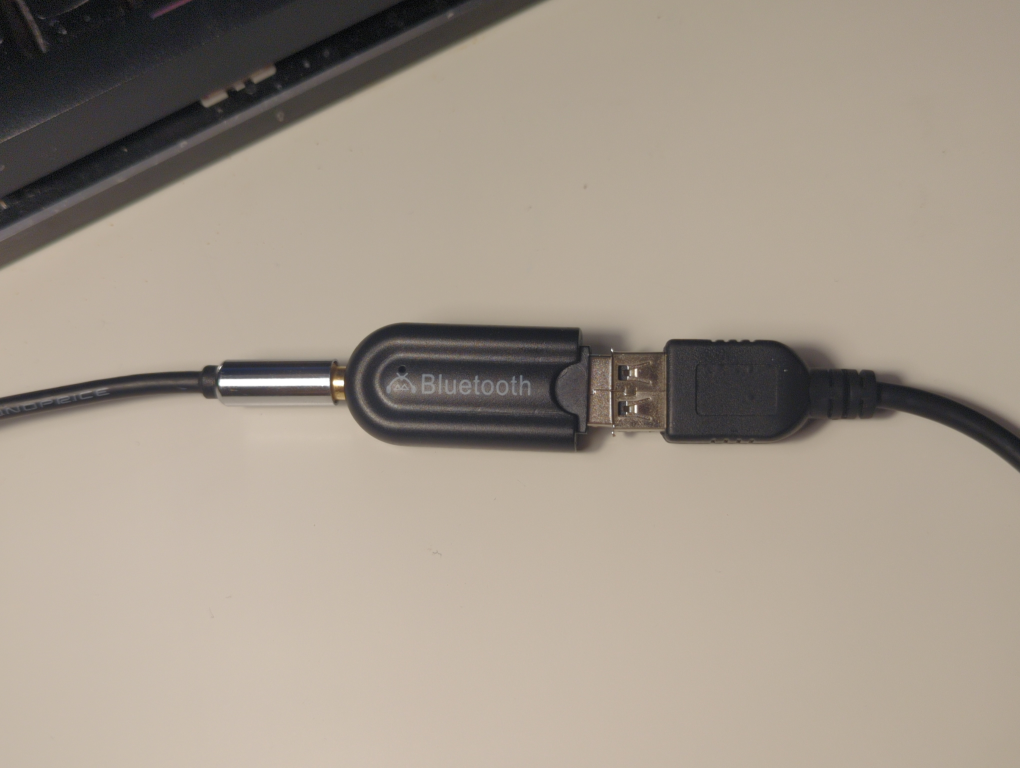
Weird USB Bluetooth Music receivers

My USB powered bluetooth audio receiver STARTED SHOWING UP AS A MASS STORAGE device.
I DIDN'T EVEN KNOW THAT THING HAD DATA LINES?!?
Did I get rubber-duckied by a BLUETOOTH RECEIVER?
WAIT YOU CAN MOUNT THE STORAGE DEVICE?!?

WTF IF YOU PLAY IT, THE FILE HAS LEGIT MP3 TAGS

OH SHIT I Think this is for it to work on crappy stereos that just play MP3 from a flash drive!!!
To adapt them to work with bluetooth
hm I don't hear anything and the mp3 file exits though
so I guess you need a dumber player that doesn't try to seek in a file
WAIT I THINK I KNOW WHAT THE OTHER FILES ARE
YOU CAN'T PLAY THEM, BUT IF YOU OPEN IT, IT TELLS THE PHONE TO GO TO THE NEXT SONG
so it's used to detect when you pressed previous/next!!! and from that, it signals to the bluetooth device to go back/forward
who the f*** makes this ASIC?!? There's no way this thing is economies of scale

2024-07-07 22:18 · Tony

Older entries >>